Keyboard menu key
On computer keyboard (or
keypad as someone calls it) there is Menu key that lots of people didn't ever use. The key is placed on the right side of keyboard between the Window Key and the Control Key. Or between AltGr and Ctrl. Or some other place, anyway it look like this:
When you press it,
Read more »Labels: key, keyboard
 Subscribe in a reader
Make shortcut for locking your desktop and keyboard
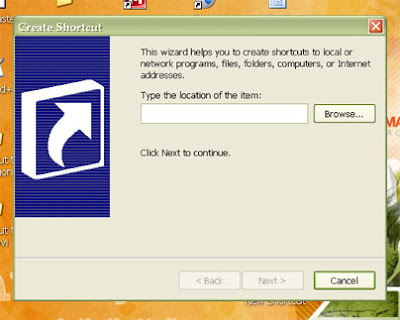
Sometimes you need to move away from computer quick without shutting it down. But there are people near you don't trust. How to keep them not to touch your computer? Lock it. OK, but how to do that quick? Well, you'll do that if you have a shortcut on desktop for looking your computer desktop and keyboard. Just double-click on shortcut. And here's how you'll make that shortcut.
Right-click on desktop.
Take "New > Shortcut".
"Create Shortcut Wizard" opened.
In text field, type: "rundll32.exe user32.dll,LockWorkStation".
Next.
Name your shortcut as you like.
Finish.
Now, you have a shortcut for locking your desktop and keyboard. Here's how you'll change it's icon:
Right-click on shortcut.
Chose "Properties".
Click on "Shortcut" card.
Click "Change Icon".
In "Look for icons in this file" field, type "Shell32.dll".
OK
Chose icon from list.
OK.
Labels: caps lock, desktop, icon, keyboard, shortcuts
Subscribe in a reader